
Tile Travels
PlaySimple GamesPuzzle
4.951.00 Reviews
- Version
- 1.576.0
- Installs
- 10.00K
- Age Rating
- Everyone
Screenshots
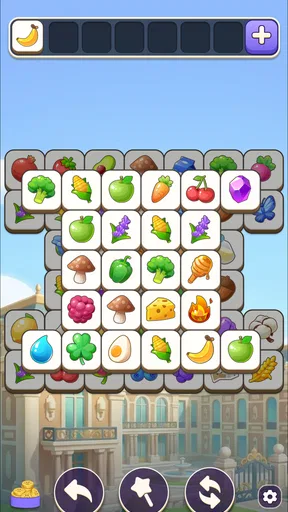
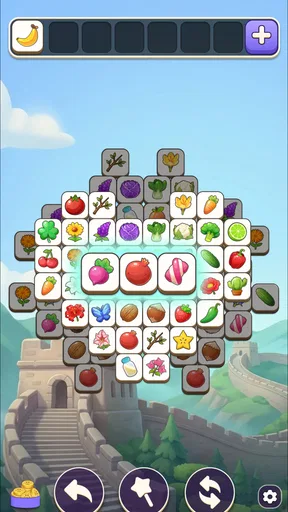

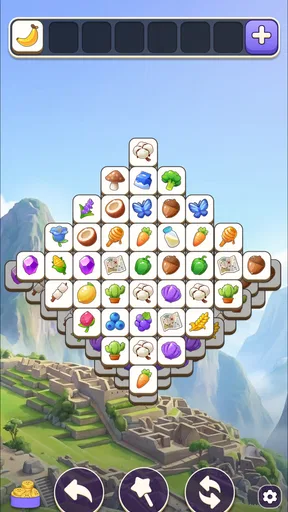

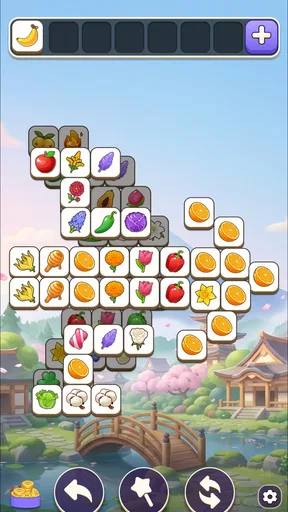
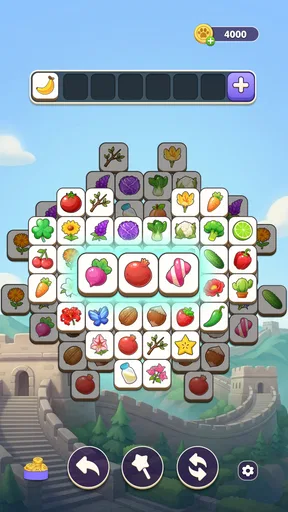

Our Review of Tile Travels
 Analysis by Appyee
I spent time with Tile Travels as a casual puzzle game, and its appeal is easy to understand: it gives you a simple tile-matching task, then wraps that task in a sense of moving through different places. That combination makes it more inviting than a completely abstract board, especially when I want something gentle rather than a demanding strategy game. It is free to start, rated for Everyone, and developed by PlaySimple Games, so it is clearly aimed at a broad audience rather than a narrow group of expert players.
My overall impression is positive, but not uncritical. The game is at its best when I need a short mental break, a low-pressure routine, or a puzzle that can be played without learning a complicated rule set. It is less convincing if I am looking for deep planning, a strong competitive layer, or a highly customizable experience for different physical and sensory needs. The central matching idea remains approachable, while the long progression gives it more staying power than a small collection of standalone puzzles.
How Tile Travels handles readability and navigation
I find that readability starts with giving each board a moment of attention rather than tapping at the first familiar shape. In this section, I focus on how the visual layout and straightforward navigation affect the effort of getting into a puzzle, especially for someone returning after a break. Those practical details lead into a closer look at how the same simple interaction can feel different depending on a player’s body, senses, and surroundings.
A clear starting point for casual players
The first strength I noticed is how quickly the main interaction makes sense. Tile matching is familiar enough that I did not need a long explanation before making useful moves. That matters for people who do not normally play puzzle games, older players who prefer direct rules, and anyone who wants to open a game during a spare moment without studying a tutorial first.
The travel theme also gives the progression a visible purpose. Instead of feeling like an endless sequence of disconnected boards, the game presents the journey as part of the motivation to continue. I found that helpful because it gives each session a little context without requiring a story-heavy commitment. You can focus on the board when you want to, or let the travel framing provide a light sense of direction.
Navigation is most comfortable when I treat the game as a sequence of small decisions. I do not have to remember a large set of controls, and the basic action is easy to return to after a break. That makes it suitable for a person who plays irregularly, perhaps during a commute or while waiting for an appointment. The game does not ask me to rebuild a complicated mental map every time I return.
What helps people who need visual clarity
Tile puzzles depend heavily on seeing differences between symbols, colors, and positions. For me, the board is easiest to read when I slow down instead of tapping quickly. That is an important practical tip: a deliberate scan across the available tiles is often more useful than immediately choosing the first obvious match. It reduces accidental moves and makes the puzzle feel calmer.
Players with reduced vision, color-vision differences, or difficulty distinguishing busy visual patterns should judge the board on their own device before committing to long sessions. A game built around tile recognition can become tiring if the symbols are small, contrast feels weak, or several choices look too similar. I would not describe the experience as a substitute for dedicated accessibility tools. Its general-audience presentation is approachable, but personal comfort will depend on display size, brightness, and the player’s visual needs.
Increasing the phone’s system text size may help with surrounding interface labels, although it should not be assumed that every game element will scale in the same way. I also recommend trying the game in both portrait and landscape orientation if the device allows it naturally, because the most comfortable grip and clearest view can vary from one phone to another. These are simple adjustments, but they can make a short puzzle session noticeably less effortful.
Learning the rhythm instead of chasing speed
One of the better ways to approach the game is to separate recognition from action. I first look for the available groups, then decide which move leaves the board easiest to read. That workflow is especially useful for players who process visual information more comfortably with an extra moment. It also makes the game more satisfying because I am solving the layout rather than tapping on instinct.
This is where the game differs from faster match-three alternatives. Those games often reward rapid reactions, chains, and visual excitement. Tile Travels feels more appropriate when I want matching to function as a quiet concentration exercise. The trade-off is that players who enjoy constant effects, urgent timers, or high-speed combos may find its rhythm too restrained.
Motor, sensory, and situational considerations
I think the most useful way to judge comfort is to try a short session in the place and posture where you would actually play. Here I consider how touch-based tile selection and repeated visual scanning may suit some routines while creating friction for others, without treating a broadly approachable puzzle as accessible to everyone. That distinction matters most when deciding whether a quiet break remains comfortable or becomes tiring.
Why the simple input can work well
The basic touch interaction is a good fit for players who prefer one-finger play and straightforward gestures. I can make progress without learning a virtual control scheme, and that lowers the physical and cognitive entry point. For someone with limited gaming experience, the difference between tapping a tile and managing several simultaneous controls is substantial.
It can also suit people who need to pause frequently. I do not approach every session with the same energy or concentration, and a puzzle format lets me stop after a small amount of progress. This is useful for anyone managing fatigue, short attention windows, or an unpredictable schedule. A game that does not require a long uninterrupted run is easier to fit around real life.
Still, touch input is not automatically accessible to everyone. Players with tremors, limited reach, joint pain, or difficulty making precise taps may find tile selection demanding, particularly when several tiles are close together. I would test the game with the device held in the most stable position available and avoid playing one-handed if that causes strain. A stylus or a larger screen might improve control for some people, but that is a personal workaround rather than a guaranteed solution.
Managing sensory load
The puzzle format is calmer than many action games, but calm does not mean sensory-neutral. Repeated visual scanning can become tiring, and any game with movement, color changes, or reward feedback may be uncomfortable for players sensitive to animation or bright effects. I prefer shorter sessions when my eyes feel tired, and I keep the phone brightness at a level that matches the room rather than turning it up automatically.
Playing with sound reduced or muted can be useful in shared spaces, libraries, waiting rooms, and workplaces. It also helps if audio feedback becomes distracting. The game remains understandable as a visual puzzle when I focus on the board, so it can fit situations where sound is inappropriate. On the other hand, someone who depends on audio cues should not assume that every important visual event has an equivalent spoken or audible signal.
Another practical point is fatigue from repetition. Matching tiles is relaxing for short periods, but extended sessions can turn the same visual task into a strain. I get more from the game when I treat it as a series of brief breaks instead of trying to push through a long stretch. That approach is not only more comfortable; it also keeps me from making careless moves simply because my attention has faded.
A realistic everyday use case
Imagine having fifteen minutes before an appointment. You want something more engaging than scrolling, but you do not want a competitive match that leaves you frustrated when your name is called. This is the kind of situation where Tile Travels fits naturally. I can open it, complete a manageable portion of a puzzle, and put the phone away without feeling that I have abandoned a team or interrupted a timed event.
The same applies to a quiet evening at home. I might play while listening to a podcast, although I would keep the puzzle at a pace that does not compete with anything important. The board gives my hands and attention a small task, while the travel theme prevents the experience from feeling like a bare grid. For people who use casual games as a way to settle down, that balance is more valuable than a large collection of complex mechanics.
It is not equally suitable for every context. During a crowded commute, glare and movement can make visual matching harder. When I am walking, cooking, or doing anything that requires awareness, I would not use it at all. The simple controls may be convenient, but they do not remove the need to hold the phone safely and pay attention to the surroundings.
Progression, purchases, and the free starting point
The game is free to download and play, which makes it easy to try without making an immediate financial commitment. Optional in-app purchases range from $1.99 to $49.99 per item, so I would recommend deciding in advance whether I am comfortable spending money before getting deeply invested in progression. The presence of a free entry point is helpful, but the possible cost range means families should discuss purchasing habits, especially when the game is used by children.
For a young player, the Everyone rating makes the game broadly approachable from an age-content perspective. That does not replace parental guidance around screen time or purchases. I would also avoid handing the phone over with payment options left entirely unmanaged. The safest routine is to use the device’s existing purchase controls and make sure the player understands that free access and optional paid items are different things.
From a design perspective, the travel structure gives me a reason to continue beyond a single board. The benefit is a stronger sense of direction than I get from many simple tile puzzles. The drawback is that progression can become the main motivation, which may make the game feel repetitive if the matching action itself stops being enjoyable. I would choose it for steady, low-pressure advancement rather than for dramatic changes from one session to the next.
Where it stands beside familiar puzzle alternatives
Compared with a traditional match-three game, this experience is better for players who prefer careful recognition over rapid chain-building. Match-three titles often create excitement through cascading pieces and quick rewards, while this game’s appeal is closer to organizing a visual problem at a comfortable pace. If I want reflexes and spectacle, I would look elsewhere. If I want a quieter board that I can revisit in short sessions, Tile Travels is the stronger fit.
Compared with a daily word puzzle, it asks less of language skills but more of visual discrimination. That makes it a useful alternative for someone who enjoys structured thinking but does not want spelling, vocabulary, or clues to determine success. A word game may be better for exercising verbal recall; this one is more inviting when I want a task that feels immediately concrete.
Compared with a minimalist offline puzzle, the travel framing gives the journey more personality, but it may also feel less pure. Players who want a completely distraction-free board and nothing around it may prefer a stripped-back alternative. I appreciate the setting because it gives the repeated matching a reason to continue, yet I understand why someone seeking only the puzzle would find the surrounding progression unnecessary.
The barriers I would want players to consider
The biggest limitation is that the game’s central challenge is visual and touch-based. That creates a barrier for people who cannot comfortably distinguish tiles or make accurate selections. Device settings can improve the surrounding experience, but they cannot guarantee that the core board will work for every player. I would treat the first few sessions as a practical test: can you identify choices without squinting, and can you tap them without pain or repeated mistakes?
Another barrier is the possibility of distraction from progression and purchases. Someone who wants a completely predictable, no-spending environment may prefer a paid puzzle with a fixed structure. Here, the free starting point is convenient, but players who are sensitive to optional purchases should establish boundaries before playing regularly.
The game may also be a poor choice for people who need strong novelty. Matching tiles can be soothing precisely because its basic idea remains stable, but that stability can become monotony. I would skip it if I were looking for a story with branching decisions, a competitive ranking system, or a puzzle format that changes dramatically from one chapter to the next.
Finally, the current version is 1.576.0 and requires Android 8.0 or later. That makes the game accessible to many existing Android devices, but anyone using an older phone should check compatibility before planning around it. The practical question is not only whether it installs; it is whether the screen size, touch response, and battery condition make tile selection comfortable for sustained use.
My inclusive verdict
Tile Travels is a welcoming casual puzzle for people who want familiar matching, gentle progression, and a travel-flavored reason to keep going. I especially recommend it to players who enjoy short sessions, prefer one-finger interaction, and like solving visual layouts without the pressure of a timer or a competitive opponent. Its average rating of 4.9 from around 2K ratings suggests that the basic formula is connecting with its audience, while over 10K installs show that it has already found a modest player base.
I would recommend trying it on the actual device and under the conditions where you expect to play. Check whether the tiles remain comfortable to read, whether tapping feels reliable, and whether the visual activity stays relaxing rather than tiring. Those checks matter more than a general promise of accessibility because the core experience depends on individual vision, motor control, and tolerance for repeated patterns.
My final judgment is that this is a good fit for calm, everyday puzzle play, not a universal solution for every accessibility need or every gaming preference. It succeeds by keeping the main action understandable and giving routine sessions a sense of travel. I would choose it over a faster match-three game when I want patience instead of reflexes, and over a word puzzle when I want visual problem-solving without language demands. I would skip it in favor of a more specialized option if I needed extensive control customization, minimal visual stimulation, or a completely fixed purchase model.
The best reason to try it is simple: it turns a small matching task into a comfortable travel routine without asking you to become an expert player first. As long as the board is readable and touch selection feels comfortable for you, it is an easy game to keep nearby for quiet breaks.
Verdict
Strengths of Tile Travels
- Relaxing tile-matching gameplay suited to short sessions.
- Travel-themed levels provide visual variety and a sense of progress.
- Simple controls make it accessible for casual players.
- Gradually increasing difficulty keeps the puzzles engaging.
- Playable without fast reactions or complex game mechanics.
Limitations of Tile Travels
- Later levels may feel repetitive for dedicated puzzle players.
- Some challenges can depend on luck rather than pure strategy.
- Hints and extra moves may be limited without optional purchases.
- Progress can become slower after the introductory stages.
- Requires patience when attempting difficult or poorly arranged boards.
Other Releases by PlaySimple Games
View All


Similar Picks in This Category
View All
Block Blast!
HungryStudio4.8

Braindom: Brain Games Test
Lahana Game Studio4.6

AMAZE!
CrazyLabs LTD4.6

Sudoku - Classic Sudoku Puzzle
Oakever Games4.7

Art Puzzle - Puzzle Games
Easybrain4.8

Amaze GO!
Oakever Games4.9
Frequently Asked Questions
What is Tile Travels and how does the game work?
Tile Travels is a casual tile-matching puzzle game built around clearing boards and progressing through travel-themed stages. You generally match identical tiles, manage the available spaces, and complete each level before the board becomes blocked. As you advance, layouts become more complicated and may introduce obstacles, limited moves, boosters, or special objectives that require more careful planning than simple matching.
Is Tile Travels free to download and play?
Tile Travels can typically be downloaded and played without an upfront purchase, making it easy to try on a compatible Android or iOS device. However, free-to-play gameplay may include optional in-app purchases for coins, boosters, extra attempts, or other conveniences. Some versions may also display advertisements, so users should review the store listing and purchase settings before downloading, especially if children use the device.
Does Tile Travels require an internet connection?
The basic puzzle experience may be available without a constant internet connection, which is useful when traveling or playing in areas with weak reception. Nevertheless, an internet connection can be required for advertisements, cloud synchronization, events, leaderboard features, updates, or in-app purchases. Availability of offline play may vary by version and device, so it is best to test a level in airplane mode after installing the game.
Is Tile Travels suitable for children and casual players?
Tile Travels is generally approachable for casual players because its core matching mechanics are easy to understand and the early stages usually introduce the rules gradually. Difficulty can increase as levels progress, requiring more planning and patience. Parents should still check the age rating, advertising content, privacy information, and in-app purchase options, since these details can differ between platforms and may affect whether the game is appropriate for younger players.
Does Tile Travels contain ads or in-app purchases?
Tile Travels may use advertising and optional purchases as part of its free-to-play model. Ads can appear between levels or be offered in exchange for rewards, while purchases may provide coins, boosters, extra lives, or other gameplay assistance. You can usually play without buying anything, but progress may feel slower when resources are limited. Before downloading, review the current Google Play or App Store listing for pricing and purchase information.
Play our best games!


